

Motivation
In some areas, performance issues can be problematic: In particular, QAbstractItemModels may be a bottleneck for the following reasons:
- A typical pattern in the data() override in QAbstractItemModel implementations is to check for the role (like the DisplayRole, the BackgroundRole for the background color, the DecorationRole for an icon displayed next to the text fetched from the DisplayRole, etc. …). Often columns and rows are treated differently in tabular models, so the checks can get quite complex, resulting in long nested if-elif-else code flows.
- Data from C++ needs to get converted when it is forwarded to Python, and vice versa. This is particularly the case for QStrings that are returned in QAbstractItemModel methods like data(), headerData(), etc. The string representation that Python uses is described in PEP 393, QStrings are stored as UTF-16 internally. In C++ it is considered good practise to make use of string literals to create UTF-16 strings at compile time. But when jumping between the Qt/C++ and the Python/PySide6 worlds, a lot of string conversions have to be done at runtime.
- In practice, QAbstractItemModels often are responsible to fetch data from specific backends. Especially in embedded environments these backends may only available in C++ in the first place. Sometimes data has to get processed which slows down the model implementation even further.
Extend PySide with C++
Enter Shiboken, the official tool for generating Qt bindings for Python. It can be installed with pip:
pip install shiboken6 pyside6 shiboken6_generator Unfortunately, Shiboken has a relatively steep learning curve and makes the build process more complex. To find a starting point, it is easiest to first download the CMakeLists.txt from the wiggly example, and just adapt it to your needs. It’s also imperative to ensure that you compile the C++ source files agains the same Qt version that Shiboken uses – otherwise you you might descend into a hell of missing includes later on. In this example I am using Qt 6.10.
To keep the example simple, let’s implement a very basic model (in this example the model inherits from QAbstractTableModel):
#include "tablemodel.h"

#include <QString>
#include <QColor>
#include <QDebug>

using namespace Qt::StringLiterals;

TableModel::TableModel(QObject *parent)
    : QAbstractTableModel(parent)
{
}

int TableModel::rowCount(const QModelIndex &) const
{
    return 1000;
}
int TableModel::columnCount(const QModelIndex &) const
{
    return 100;
}

QVariant TableModel::data(const QModelIndex &index, int role) const
{
    std::vector<QColor> backgroundPalette = {
        QColor(u"#D97D55"_s),
        QColor(u"#F4E9D7"_s),
        QColor(u"#B8C4A9"_s),
        QColor(u"#6FA4AF"_s)
    };
    if (role == Qt::DisplayRole) {
        return u"(%1, %2)"_s.arg(index.row() + 1).arg(index.column() + 1);
    } else if (role == Qt::ToolTipRole) {
        return u"Row: %1 - Column: %2)"_s.arg(index.row() + 1).arg(index.column() + 1);
    } else if (role == Qt::BackgroundRole) {
        return backgroundPalette.at(index.row() % backgroundPalette.size());
    } else if (role == Qt::ForegroundRole) {
        return QColor(Qt::black);
    }
    return QVariant();
}

QVariant TableModel::headerData(int section, Qt::Orientation orientation, int role) const
{
    if (orientation == Qt::Horizontal && role == Qt::DisplayRole) {
        return u"Section: %1"_s.arg(section + 1);
    }
    return QAbstractTableModel::headerData(section, orientation, role);
}
I skip the header as it is very straightforward. What’s more important, is that we need to tell Shiboken about the bindings to generate. Therefore we need to create a file named binding.xml:
<?xml version="1.0" encoding="UTF-8"?>

<typesystem package="modelbinding">
    <load-typesystem name="typesystem_widgets.xml" generate="no"/>
    <load-typesystem name="typesystem_core.xml" generate="no"/>
    <load-typesystem name="typesystem_gui.xml" generate="no"/>
    <object-type name="TableModel"/>
</typesystem>
Note that we need to load the type systems for all Qt modules that you are using. The wiggly example I linked above only adds the type system for the widget module. On the other hand, QAbstractItemModel is part of Qt core, so the corresponding line must be included here also.
Last but not least, the file binding.h is also needed. It looks as following:
#ifndef BINDINGS_H
#define BINDINGS_H
#include "src/tablemodel.h"
#endif // BINDINGS_H
Building
Create a build folder, run cmake and then make install – the installation step is necessary to copy the binding libraries to the project folder:
mkdir build && cd build
cmake -DCMAKE_PREFIX_PATH=~/Qt/6.10.0/gcc_64/ ..
make install
Pitfalls: Shiboken uses clang to parse the c++ header files and generate the bindings. I had to export CLANG_INSTALL_DIR to point Shiboken to the clang installation.
export CLANG_INSTALL_DIR=/usr/lib/llvm-18 If you don’t use Qt 6.10, you might run into a cmake error telling you that cmake cannot find Shiboken6ToolsConfig.cmake – in this case, check the wiggly example for your Qt version, download the utils script and adapt CMakeLists.txt accordingly.
Test
After you have installed the compiled binding libraries (in the example libmodelbinding.so and modelbinding.abi3.so), you can use your C++ model in you PySide6 project:
import sys
import time

from PySide6.QtCore import QObject
from PySide6.QtGui import QPaintEvent

from PySide6.QtWidgets import (
    QApplication,
    QWidget,
    QTableView,
    QPushButton,
    QVBoxLayout,
)

# Python binding from the C++ QAbstractItemModel
from modelbinding import TableModel

class TableView(QTableView):
    def __init__(self, parent=None):
        super().__init__(parent)
        self.elapsed_times = []
        self.warmup = 3

    def paintEvent(self, event: QPaintEvent) -> None:
        start_time = time.time()
        super().paintEvent(event)
        elapsed_ms = (time.time() - start_time) * 1000
        print(f'Time in Paint Event: {elapsed_ms:.6f} ms')
        if self.warmup:
            self.warmup -= 1
        else:
            self.elapsed_times.append(elapsed_ms)

    def printAverageElapsedTimes(self):
        if len(self.elapsed_times) > 0:
            print(f'Avg elapsed times: {(sum(self.elapsed_times) / len(self.elapsed_times)):.6f}')


if __name__ == "__main__":
    app = QApplication()
    w = QWidget()

    w.resize(1600, 1600)
    layout = QVBoxLayout()

    table_model = TableModel()
    table_view = TableView()
    table_view.setModel(table_model)

    quit_button = QPushButton(QObject.tr("Quit"))
    quit_button.clicked.connect(app.quit)
    app.aboutToQuit.connect(table_view.printAverageElapsedTimes)

    layout.addWidget(table_view)
    layout.addWidget(quit_button)

    w.setLayout(layout)

    w.show()
    sys.exit(app.exec())
When you start the application, you should see the table with the data from the C++ model:
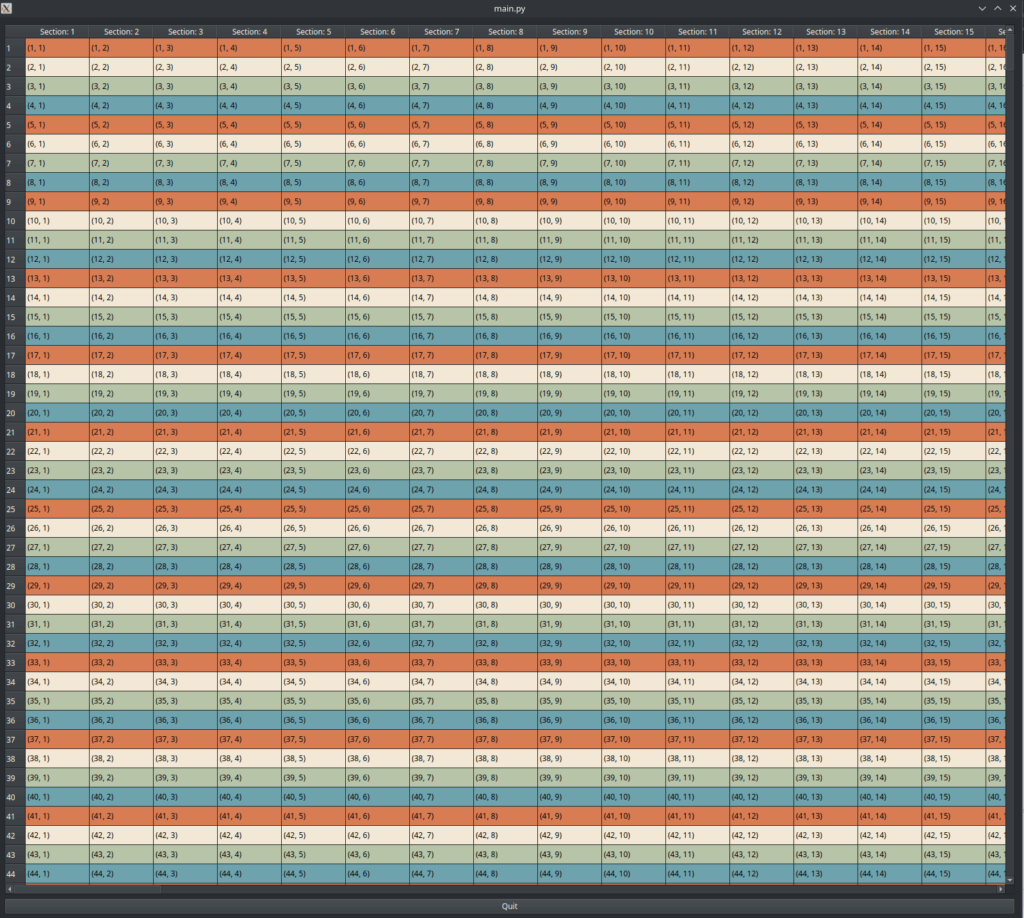
Here, I set the window size to 1600×1600 to display multiple table cells in the view which results to many data() calls – this makes performance measurement more meaningful. The average time spent within paintEvents (where display, decoration, foreground, and background roles are typically obtained by the underlying delegate) is printed on the console when the application exits. The model is relatively simple yet when scrolling through the view we can still observe a noticeable improvement in performance. Moreover, not only is it quicker, it is also much more consistent with significantly fewer spikes. While this sounds like garbage collection taking place, disabling it had mo discernible effect. Measured on my computer, 1 or 2 ms might not seem like much but that’s still 6 to 12 percent of a single frame on a 60 Hz display: time that you can now spend on doing other things. The difference can of course be much more pronounced on weaker machines.
Time spent in paintEvent (ms)
No Data Found
Conclusion
A good strategy might be to start implementing and prototyping an application with PySide6 and move performance-critical code to C++ later. In my opinion it’s a beautiful thing to be able to write software in a productive language like Python and nonetheless have the confidence of being able to replace underperforming parts with equivalents written in a language like C++.